Prices • Buy Now • See More Features • See The Specifications • "So what do you get in the box?"



Turn off the power on your computer
(unless you have a USB connection, when this is not necessary).


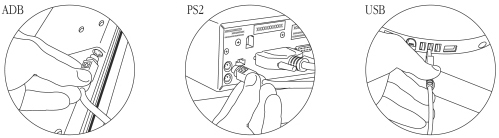
Connect your Peninsula Phoenix II Bar Code Reader to a spare port on your computer.
You will already have specified the connection type (USB, PS2 or ADB) on ordering your reader.
• Do not plug USB connections into the keyboard. The keyboard does not have enough
power to power the reader and damage may occur. If you are using the Windows 95
operating system you may be required to install additional software from your
Windows 95 system installer disc.
• Do not plug ADB connections between the keyboard and the computer. This will disable the
keyboard power switch. Always connect the reader between the keyboard and the mouse.
• Do not plug Keyboard Wedge (PS2) connections into the mouse port. Always connect the
reader between the keyboard and the computer.

Turn on the computer. The reader will beep to indicate that it is being initialised.
