barcode readers, bar code scanner, barcoding, bar code reader, barcode scanner, Mac and PC
Mac and PC barcoding software barcode readers bar code scanner
Mac and PC barcoding hardware barcode readers bar code scanner
Barcode Readers Mac and PC Barcode Readers The most cost effective range Barcode Reader Secure On-Line Shop Available for immediate delivery Email Us at sales@peninsula-group.com Barcode Readers In Stock
 Barcode Readers Welcome You • Barcode Readers From Stock • 20 Years of Barcoding Experience At Your Service
Barcode readers from stock
Barcode Readers (Barcode Scanners)    Barcode Printers    Barcode Making Software   Asset,Loan,Item Tracking     Bundles


QuickMenu
  Swift III Price List
Main Page
See The Specifications
What Do I Get In The Box?
How Do I Connect It?
Is It Right For Me?
Free Item and Asset Software
What Can I Use It For?
Download A Brochure
Buy Direct Now
QuickFeatures
• Compatible with Windows and Macintosh OSX straight from the box
• Integrated error checking decoder
• True plug and play.No drivers required
• Light ergonomic design
• Reads direct to cursor position when plugged into USB or Serial port
• Robust and Easy To Use
• Reads all standard barcode types
• For use in industrial, retail, office and other applications
• 1 Year Warranty
• FREE Asset, Item and Loan Software

QuickUses
• Retail
• Healthcare and Medical
• Inventory and Stock Control
• Office Automation
• Document Tracking
• Light Industrial
• Asset Tracking
• Item Tracking
• Library Applications
• Goods Receiving
• Goods Shipping


1
Turn off the power on your computer
(unless you have a USB connection, when this is not necessary).


2
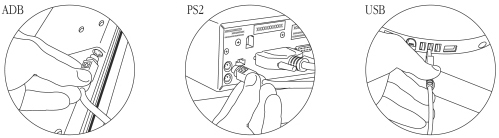
Connect your swift III Bar Code Reader to a spare USB port on your computer.

• Do not plug USB connections into the keyboard. The keyboard does not have enough
power to power the reader and damage may occur. If you are using the Windows 95
operating system you may be required to install additional software from your
Windows 95 system installer disc.

• Do not plug ADB connections between the keyboard and the computer. This will disable the
keyboard power switch. Always connect the reader between the keyboard and the mouse.
• Do not plug Keyboard Wedge (PS2) connections into the mouse port. Always connect the
reader between the keyboard and the computer.


3
Turn on the computer. The reader will beep to indicate that it is being initialised.

That's it. You can now scan your bar codes.

E&OE

To add a Swift III Barcode Reader Wand to your Shopping Basket
Choose your solution and click "Buy Me".

Item
Price
Buy Now

Barcode Reader (Swift III Wand - USB - Mac and PC)
With
FREE QuickTrack Software

Order 3 readers and receive instant discount in your shopping basket.

£115


IN STOCK with FREE Delivery


Barcode Reader (Swift III Wand - PS2 - PC)
With
FREE QuickTrack Software

Order 3 readers and receive instant discount in your shopping basket.

£115


IN STOCK with FREE Delivery


Barcode for FileMaker Two Code Types Single User License
(Bundle Deal including Swift III USB Bar Code Reader Wand)
£175


IN STOCK with FREE Delivery


Barcode for FileMaker All Code Types Single User License
(Bundle Deal including Swift III USB Bar Code Reader Wand)
£340


IN STOCK with FREE Delivery


Back to Top

Our Shopping Site is SSL3 Secure

Service Promise >>>
Delivery and Payment Details

Useful Links To Other Sites

Copyright © 1987-2005 Barcode Readers.com a members of the Peninsula Group. All rights reserved worldwide.

Email sales@peninsula-group.com
Telephone 44 (0) 1723 890699 • Fax 44 (0) 1723 891674
(Office Hours 9-5 GMT)

Barcode Readers, ai recognition, Hold Calling, barcodeplugins and Peninsula Software are members of the Peninsula Group


Website developed by Everything but the Product